 Donate
For Parents and Sitters
With the Babsy App, we want to grow our community into a thriving network of like minded parents and sitters. Within the App both can directly communicate with each other.
Babsy will not share personal data of parents and sitters with third parties.
We take all the necessary steps required to ensure that all personal data is protected. For further information, please refer to our `Privacy Policy` on our website.
The length of the sitting is calculated when the parent enters the start time and end time, this time will be confirmed by the sitters and can be ammended. The babysitter will receive all this information listed in the job.
Currently the app is available for download from the Apple App Store and on Android. 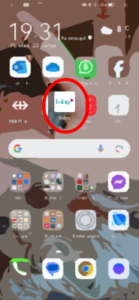
There is no guarantee that you will find someone, but with the job posting, the chance of finding someone is very, very high. We always recommend getting to know as many sitters as possible to build a portfolio of sorts so that you can always find someone when you need help. But the sitters also decide for themselves whether and which assignment they want to accept. Babsy is like a neighborhood helper, a platform where parents and sitters are able to meet each other in a safe and trustworth area - we support where we can with all our might. But above all, it's about building your "village" around yourself again, as it used to be. Nowadays it doesn't just need one Mary Poppins, but a whole village of Marry Poppinses 🙂 and we're happy to support that.
You can set your password back on your own in the App. If it does not work: Please contact Babsy immediately at sitter@babsy.ch or parent@babsy.ch and let us know. We will reset your password so that you can log in again and change it yourself.
This is a safety mechanism, please contact us proactively if your profile is not or no longer working. For new profiles, we usually activate them once a week so that they then work. If adjustments are made in the profile, the app immediately jumps back into non-use mode. Please just get in touch with us so we can unblock the profile for you after you let us know what we can control.
On the following link you can find the video of how the process works when parents book sitters directly or make an open request. This video is for parents and sitters!
https://www.youtube.com/watch?v=nrkHNu9uBC8
It could happen, that your country is (still) not right edited. But Attention: this can only be changed once a year, if you are not officially "based" in switzerland in the App store, you can't use the App.
ANDROID
Open the Play Store on your Android phone and select the profile icon in the top right. From here, tap "Settings", then "General" - "Account and device settings". Under "Country and profiles" you can change the country if you are already in that country.
How to change your Google Play country - Google Play Help
iOS
Change the region from an iPhone, iPad or Apple Vision Pro
1. Open the Settings app.
2. Tap your name, then "Media & purchases".
3. Tap "View account". You may be asked to sign in.
4. Tap "Country/region".
5. Select the new country or region.
6. Tap "Change country or region".
7. Tap your new country or region, then read the terms of service.
More Information can be found via this link or otherwise simple google it: https://support.google.com/googleplay/answer/7431675?hl=de#:~:text=Von%20der%20Landesversion
This can't be answered in a one-size-fits-all way. What's important is that the UNIA minimum wages are observed from 5 hours of work, as well as the cantonal minimum wage regulations. Generally, parents put out a listing with their desired offer, and sitters can respond to it, or parents contact sitters directly and know their highest available rate. Ultimately, though, it's a matter of negotiation between the two parties, and as long as they meet legal requirements, they can agree on something that works for both. We recommend referring to the recommendations from KIBE Suisse.
A babysitter comes for occasional jobs to look after your kids, whereas a nanny has a fixed employment contract with you and works at set times, for example, weekly. However, we have some nannies registered with us who also like to do babysitting jobs on the side. Did you get a cancellation even though the appointment was booked? It’s very rare, but it’s possible that the babysitter cancels an already booked appointment. You’ll then get a push notification and usually a personal message from the babysitter. The reason is mostly sudden illnesses. In this case, Babsy steps in and tries to find a new babysitter for you immediately – and most of the time, we succeed!
Receiving the push notification depends on whether all the settings on your phone are set up correctly – so please make sure that you’ve allowed Babsy to send push notifications both in the app itself and in your phone’s settings. Be sure to contact us if it doesn’t work, and we’ll be happy to help. Can a babysitter be booked without the app? A babysitter introduced to you through Babsy can, according to the terms and conditions, only be booked through the app with a valid subscription. Please understand – otherwise, we wouldn’t be able to offer our Babsy service, which sets us apart from other babysitter platforms, in this form. The special search request (see above) is an exception.
That’s probably because the settings on your phone weren’t set up completely correctly. Please check your phone’s settings to see if the kidsitt app is allowed to send you notifications. And in the app itself, you also need to make sure that you’ve enabled push notifications.
Your last name and your address are never visible to the parents,
they are only stored in our back office.
Your phone number will only become visible to the parents once they have booked you for a babysitting appointment after you’ve accepted.
Besides first name, age, location, and hourly rate, parents can also see, for example, how many kids you’re willing to watch, which age groups you’d take care of, what your previous experience is, whether you’ve taken a first aid or babysitting course, what languages you speak, and whether you have a driver’s license. We get this information from the questionnaire and our interview with you. They never see your last name or your address.
From 5 hours of work in hourly jobs, the legally set minimum wages of UNIA apply, which are CHF 15.00 net per hour.
https://unia.ch/de/berufe-branchen/hauswirtschaft
https://www.seco.admin.ch/seco/de/home/seco/nsb-news.msg-id-35736.html
In onboarding, we get to know you, and you get to know us. Mutual expectations can be clarified, and everyone knows when and where to ask questions. We also explain legal requirements, etc.
For sitters, onboarding is like a classic job interview, it's intensive for the sitter. For parents, it's more of a get-to-know-each-other conversation and mostly informative.
The meeting is always scheduled for an hour. For sitters, it usually takes the full hour, while for parents it depends on their prior knowledge, but you should definitely expect between 30-45 minutes.
We did have a few attempts before it was finally in February 2022 that we could actually launch the app and the connections then ran through the app.
In the App Store, it says that the company Apptive from Austria made the app, and the company is based in Austria. However, the app itself was created in Switzerland according to the applicable data protection standards and is also hosted here.
No, not by yourself. Deleting the app can only be done through Babsy, you need to contact them for that. Keep in mind, though, that you'll have to go through the whole sign-up process again if you want to log in again, etc.
The relevant factor for joining a compensation fund is always the employer's place of residence (place of work).
The conversion factors change from time to time. For example, the net/gross factor for the year 2020 in the simplified procedure (= procedure with tax deduction) is 0.88625, which means that CHF 20.00 net / 0.88625 = CHF 22.55 gross salary (note the rounding differences that may occur). In the calculations, vacation pay is already included. Therefore, the calculator is only a non-binding tool. The rounding differences become smaller the higher the reported annual salary is.
The standard accident insurance for domestic employees is for employees who work up to 8 hours per WEEK in the household, and it covers accidents on the way to work and during work for about 100 CHF per year. If they work more than 8 hours, accidents outside of work also need to be covered. NBU - The policy is always through the employer, who can pass the premium onto the employee. Often, the premium is split between employee and employer. The 100 CHF is the minimum premium. The premium rate is 13.5833 per mille of the insured earnings. This way, the premium can be calculated in advance. Since the compensation in the event of a claim is based on the actual AHV salary, which can be traced from the AHV statements, the declared salary should correspond to the salary planned at the time the contract was signed. Also, a final payroll is always issued at the end of the year, which must state the salary declared to the AHV. If the amount then doesn’t match the salary declared in the contract, an adjustment follows. So it doesn’t make sense to declare a lower salary in the contract.
Once an NBU has been taken out, it's a good idea to notify the insurance that the salary may be adjusted downwards. Any possible refund will, in any case, only be up to the minimum premium.
That depends, among other things, on the babysitter's age and how long they’ll be working. You can find more information under ‘Legal and Insurance Questions’ below. If you want to register your babysitter, we’ve made it really easy for you and have partnered with www.quitt.ch. Quitt takes care of the registration, payroll, and insurance for your babysitter. Please contact us for the discount code!
You might not have noticed that a message appears asking you to complete your onboarding conversation. It’s the last and most important step before we can approve your profile.
Please follow the instructions shown on the lock screen. This is the security measure to ensure that only verified and checked users can use the app. Once you’ve had your conversation, your profile is usually activated within a week at the latest, so you can search, book, and be found.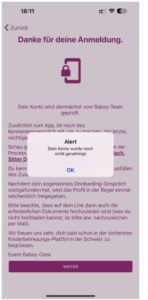
That can happen. If that's the case, the app will show you what’s still missing, like in the picture below (it will say that this field is still required). If you don’t have the information at hand, please indicate that you will submit it later. Incomplete profiles are continuously checked and, if everything isn’t submitted, they can be temporarily blocked again. So always send all documents as quickly as possible or upload them if you can.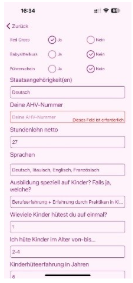
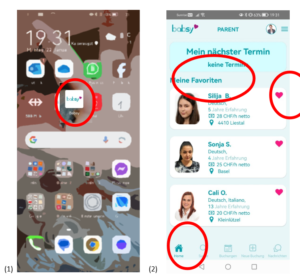
Ideally, you should put the Babsy app directly on your home screen (1), so that the notification icon (red dot) is quickly visible (especially if you haven’t enabled push notifications).
On the dashboard, which is the first “page” in the app (Home button at the bottom left), it shows you your favorites—these are usually the sitters you’ve already met or the ones you most often use. The more you have, the better. You can add or remove them by clicking the heart on the right of the profile.
Of course that exists, and just as the requests are different, so can the solutions be. We therefore recommend including several days in a single request, as well as posting each day separately! This really helps make sure all the days get filled. As mentioned in the onboarding, we’re very successful also because the job-sharing concept, with a whole “village of Mary Poppins” around you, greatly increases care reliability. With this request setup, you actually have very good chances of finding one or more people to cover all the days and times.
Fortunately, this happens very rarely, but it is possible that the babysitter might have to cancel an already booked appointment. You’ll then receive a push notification for your information and usually also a personal message from the babysitter. The reason is mostly due to illnesses that come up at short notice. In this case, Babsy steps in and immediately tries to find a new babysitter for you – and often we succeed! In the worst case, the appointment can’t take place, but of course, there’s nothing to pay then.
A babysitter who has requested you through Babsy should, according to the terms and conditions, be booked exclusively through the app. Please understand – otherwise, we unfortunately won't be able to offer our Babsy service, which sets us apart from other babysitter platforms, in this form in the long run, and we rely on your honesty and your contributions.
You might not have noticed that a message appears asking you to complete your onboarding conversation. It’s the last and most important step before we can approve your profile.
Please follow the instructions that appear on the lock screen. This is the security measure to ensure that only verified and checked users can use the app. Once you’ve had your conversation, the profile is usually activated within a week at the latest, so you can search, book, and be found.
We have special areas where you can find information just for you. For the login details, parents can contact parent@babsy.ch and sitters can contact sitter@babsy.ch. The login details were provided in the welcome email, but we’re happy to help if you no longer have them. You can access these areas through the homepage under LOGIN.
These are a suggestion from the parents. You as the sitter should confirm them, and all further details will be clarified in the chat.
For Parents
The app is free to download. For successful bookings there is a booking donation Babsy asks for which is on top able to being deducted of the taxes by the following year due to our status of a volunteering organization. Other membership options are available too.
The app is free to download from the App Stores. There is a link to download the app on our website. Any questions? Check out our video about it: https://youtube.com/shorts/fwYF6KgpvJM?feature=share
Within the App there is no payment option (yet), payments can be done by invoice or via TWINT.
Yes, Sitters have a very intensive Check including an interview, reference checks and they need to deliver many documents including Criminal record, Special Criminal record etc.
Sitters are also vetted by parents too and they get valuated by the parents too. Parents can review sitters profiles for advanced skills such as CPR training. Parents can then, if there is enough time, always arrange to meet sitters prior to the booking so they have peace of mind and can be sure, the children already know the sitter.
No, this function will be available in a later version of the App. For the actual version parents can pay sitters directly or ask the service via Babsy trustee.
In the next version for sure! This will be a key feature of the app and helps other parents decide which sitter to hire. But feedbacks can be give to Babsy as we want to add them into the App as soon as the function is working.
Parents only pay at Babsy if they have successfully found someone. For the match, Babsy receives a small booking donation from CHF 2.50 which supports the non-profit association and ensures the service. Babsy is extremely grateful for all donations. The donations are also tax deductible in the following year. Auch Jahresspenden-Abos können gemacht werden. Annual donation subscriptions can also be made.
You simply click on `book sitter` and follow the instructions. There is a message function too, which allows you to chat with a sitter also.
Yes you can. You can also create a job posting specific to your needs, and babysitters can apply for your job. You can review the applicants and pick the right babysitter for you.
Babsy and the advertisement must be informed of the disease(s) involved and whether they are contagious. If the infection is high, such as Corona etc., no sitters will be sent. In the case of illnesses that the sitters already had, they can decide for themselves. There is no promise or guarantee of finding someone. Despite everything, even if you or the child/ren are ill, there is still a high probability of finding sitters who have already been through it and who are also willing to take on the job.
Of course, you probably want to know more about the qualifications of our babysitters – like which languages they speak, how much experience they have, whether they have completed a babysitting course, or if they have a driver's license. You can see all of this by clicking on the photo or the name of the babysitter, which will open their detailed profile. Do you have special requirements for the babysitter? Our filter function allows you to search specifically by age, languages, and hourly rate. Get in touch if you have any other specific requirements. We’re happy to help: info@kidsitt.com.
We recommend making an open request according to the instructions for the app in the FAQ sections, as this gives you the highest chances of getting responses from as many people as possible. Meet as many sitters as you can and build your own 'Mary Poppins' portfolio this way.
No problem – just enter any random date and a random list of tasks, and you'll see all the sitters in your area. This doesn't automatically book anyone; booking happens as described above. After you've looked at the profiles, just end the process without actually sending a request. Are all the babysitters shown to you available during the period you selected? First of all, you'll see all registered babysitters within 25 km of your location. Whether they have time or not, you'll find out once you send a request and they accept or decline. Would you like to meet a babysitter before the job or contact them by phone? It’s completely understandable that you’d like to meet the babysitter you booked before the job. Once the babysitter accepts via the app and you confirm the booking, both sides can see each other’s phone numbers in the app. So there’s nothing stopping a phone call before the job. You can also request a ‘get-to-know’ meeting, which is also listed as an option in the task list.
If you’re scheduled in the work plan (which must be available or the shifts clearly defined), but the employer cancels the shift, the employee is still entitled to pay. This also applies if you’re sent home earlier than planned due to lack of work. So finishing work early still means you get paid for the planned time. It’s different if the sitter has to leave early or arrives late—any personal fault isn’t paid, then only the actual working time counts. Changes or cancellations can be made up to 24 hours before the shift without cost, but we ask parents and sitters to show each other some flexibility.
In general: the service is to be paid for as planned. If someone is there longer or shorter, it depends. If the sitter has to come earlier or stay longer, of course the working time must be paid. But if the parents no longer need the time, the service is normally owed (for example, if the sitter is sent home before the official shift actually ends). However, we ask both parents and sitters to show goodwill towards each other.
Employees (sitters, nannies, etc.) must be mandatorily insured by their employers (parents) for occupational accidents (UVG). If the person works more than 8 hours a week in a household, they must also be insured by the employer against non-occupational accidents (NBU).
You pay the babysitter directly with the hourly rate listed in the app – either in cash or via Twint – at the end of the appointment. In your app, you’ll find a stopwatch that starts running when the appointment begins. When you stop it, it shows you the amount you owe the babysitter. Please agree with the babysitter at the very beginning how you want to pay them.
Your last name and address are never visible to the parents,
they are only stored in our back office.
Your phone number only becomes visible to the parents once they have booked you for a babysitting appointment after you’ve accepted.
Besides your first name, age, location, and hourly wage, parents can also see, for example, how many kids you feel confident looking after, which age groups you would babysit, what your previous experience is, whether you’ve taken a first aid or babysitting course, which languages you speak, and whether you have a driver’s license. We get this information from your questionnaire and our interview with you.
They never see your last name or your address.
First of all, you see all the babysitters who are making themselves available. Everything else, like meet-and-greet appointments, can be arranged directly afterwards using the chat function.
These are a suggestion from the parents, you as the sitter should confirm them, and all further details will be sorted out in the chat.
For Sitters
It is free for babysitters to download the app and create a profile. Responding to messages and getting accepted for Jobs is also free. Only the once to pay membership for the volunteering club which is lifelong of CHF 10.00 has to be paid withing one year.
The parents either paid directly (in cash or TWINT) or they use Babsy trustee and then you get all stakes conveniently paid out regularly every month via Babsy Treuhand.
You can set your typical availability within your Sitter profile.
Parents have the option to rate and review the sitter after the babysitting job is complete.
If cancelation of a job cannot be avoided, we recommend doing so as soon as possible so the parent can find another sitter to complete the job or the sitter can make themselves available for another job. Guilty is the cancellation policy of our TAC,
You will be able to see the parents profile, which will include a profile photo, description and later also their ratings and reviews.
The parent will be able to see your profile, which will include a profile photo, description about you and your availability, years of experience and some other details that are important as well, in a later version, ratings and reviews.
The process is three-stage, you first create your profile, then there is a conversation with the Babsy crew and then the criminal and special criminal records are obtained. Then you can be booked. Nevertheless, we recommend that parents, if time allows, that you can meet in advance to get to know each other.
No, of course not. However, if you as a sitter feel able and, for example, have already had the illness and the risk of infection is therefore small to 0, you can of course carry out the herding order even if you are ill (whether child or parents). It is only important that it is clear which illness(es) it is and you as the sitter decide whether you want it yourself.
As you have already realized, we have a beautiful picture CD/CI (here you can find the guiedleines: Guidelines_Photo_EN.pdf
If you want to change it yourself, you can simply delete and replace the background yourself (see picture).
If you're scheduled to work (the schedule must exist, or the assignments must be clearly defined) but your employer decides not to use your services, the employee still has the right to their pay. This also applies if you’re sent home earlier than planned due to a lack of work. That means finishing work early still means you get paid for the planned time. It’s different if the sitter has to leave early or arrives late; if it’s their own fault, that time isn’t paid, and only the actual hours count. Changes or cancellations can be made up to 24 hours before the shift without cost, but we ask parents and sitters to show mutual flexibility.
In general, the shift still needs to be paid as planned. If someone is there longer or shorter, it depends. If the sitter has to come earlier or stay longer, of course the shift time has to be paid. But if the parents no longer need the time, the shift is still owed (for example, if the sitter is sent home before the official shift actually ends). We do ask both parents and sitters to show some mutual flexibility.
If, for example, you get sick and can't make the agreed-upon appointment, please cancel the appointment via the app so we can arrange a substitute babysitter for the parents. Also, please inform the parents directly about your cancellation via call or SMS so they are aware.
Make your profile as appealing as possible – upload a photo that looks trustworthy and write a nice text about yourself – for parents, of course, the first impression counts just as much as all your qualifications.
Then another babysitter was faster than you. Parents can request several babysitters at once, so it's a good idea to accept or decline as soon as possible.
After a booking has been made, you can see the parents' phone number in the app and contact them. If you still have questions before accepting a request, please contact us directly and we will help you coordinate your questions with the parents.
We recommend contacting the parents directly before an appointment. That way, you can get to know each other briefly and discuss if there's anything important that needs to be clarified beforehand.
Your last name and address are never visible to the parents,
but are only stored in our back office.
Your phone number only becomes visible to the parents once they have booked you for a babysitting appointment after you’ve accepted.
In addition to your first name, age, location, and hourly rate, parents also see, for example, how many children you're willing to take care of, which age groups you'd babysit, what your previous experience is, whether you've taken a first aid or babysitting course, which languages you speak, and whether you have a driver's license. We get this information from your questionnaire and our interview with you.
They never see your last name or your address.
These are a suggestion from the parents, you as the sitter should confirm them, and all further details will be sorted out in the chat.
